Free Work Order Template for Contractors
A work order is the document that authorizes and records a specific piece of work before or while it happens — it is not a price proposal (that’s an estimate) and it is not a bill (that’s an invoice). It needs a work order number, the date and job site, who requested and who authorized the work, the technician assigned, a description of the work, materials used, labor hours or a flat rate, and a signature line. Use one for service calls, time-and-material jobs, and any time scope grows mid-job and you need it approved in writing before you keep working. Below is a free layout, plus a real HVAC service-call example.
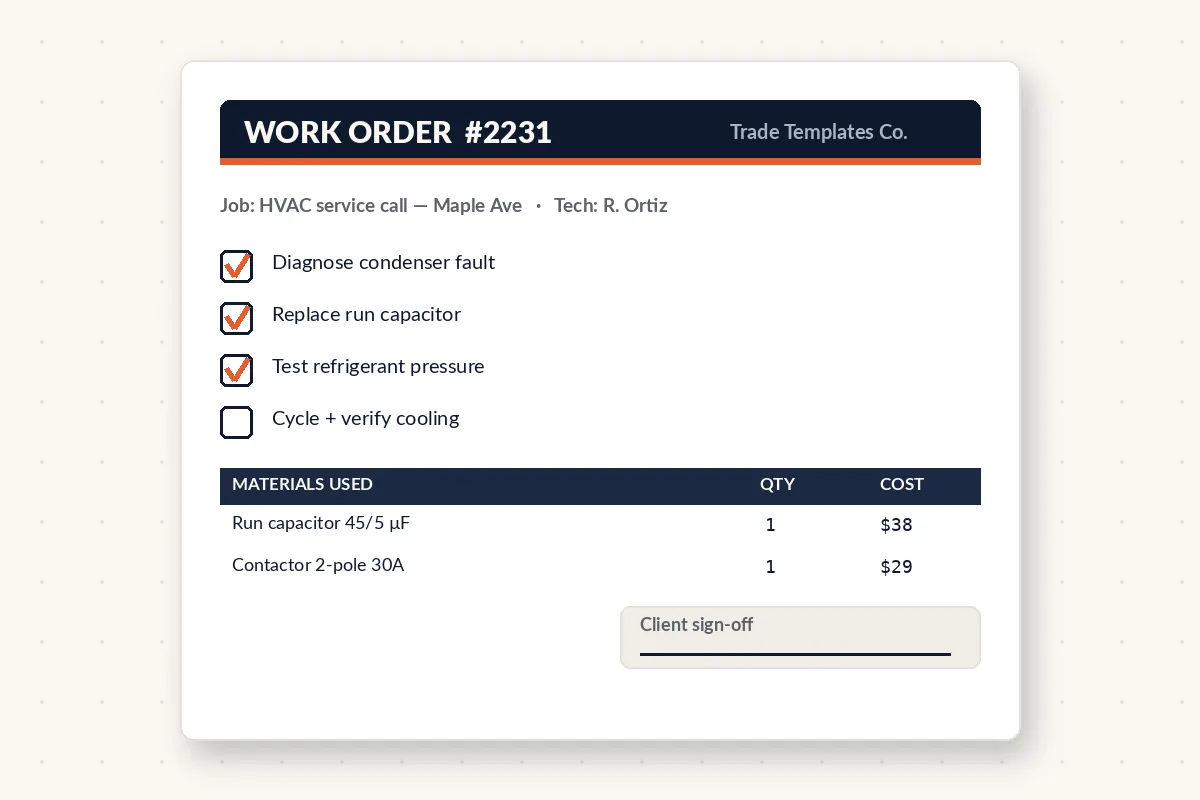
Most solo contractors only use two documents — an estimate before the job and an invoice after it — and skip the one in between that actually protects them on the day the work happens: the work order. It is the field-level record that says exactly what was requested, by whom, what the technician found and did, and what materials went into the job, signed before the truck leaves. Without it, a T&M dispute comes down to your word against the client’s memory.
Work order vs. estimate vs. invoice
The three documents cover three different moments in the same job, and confusing them is where most billing disputes start:
- Estimate — given before the work, a proposed price based on a described (often not yet fully diagnosed) scope. Non-binding until accepted.
- Work order — created at the start of the job or service call, it authorizes the specific work about to happen and captures what actually gets done, including anything the estimate could not have predicted (a hidden leak, a seized part, an added run).
- Invoice — created after the work is done, billing for exactly what the work order recorded. A clean invoice should trace back line for line to a signed work order.
What every work order needs
A work order is a field document first and a paper trail second — both jobs depend on these fields being filled in before the technician leaves:
- Work order number — sequential, and the same number the eventual invoice will reference.
- Date and time the work was requested and performed.
- Client name and job site address — especially important for property managers and commercial accounts where the billing contact and the site are different.
- Requested by / authorized by — the name of the person who called it in or approved the work on site, with a signature line.
- Technician assigned — who did the work, useful for callbacks and quality tracking.
- Description of work requested and, separately, work actually performed — these are not always identical, and the gap is exactly what protects you.
- Materials and parts used, with quantity and part number where relevant.
- Labor — hours and rate, or a flat fee, plus the service-call or trip charge on its own line.
- Signature line — the client or site contact signs off that the work described was completed to their satisfaction, before you invoice.
A real work order, line by line (an emergency no-heat call)
Here is how a same-day HVAC no-heat service call reads on a properly filled-out work order — note that the diagnosis and the added part were not on the original phone-booked request:
| Field | Detail | Amount |
|---|---|---|
| Work order # | WO-2026-0311 | — |
| Requested work | Furnace not producing heat, tenant reported cold house | — |
| Diagnostic / trip charge | same-day emergency dispatch | $135 |
| Work performed | replaced failed igniter, cleared blocked condensate line | — |
| Parts used | hot surface igniter, condensate trap fitting | $95 |
| Labor | 1.5 hrs @ $110/hr | $165 |
| Total (converts to invoice) | $395 |
The client’s original request was “no heat” — the igniter and the blocked condensate line were found on site, not booked over the phone. Because the work order recorded the diagnosis and the client signed before the technician left, the $395 invoice that follows has nothing left to dispute; it is simply a clean copy of what the work order already says. See our contractor invoice template for the billing document this feeds into.
How a work order protects you on change orders
Scope grows mid-job more often than it shrinks — a wall opens up and there’s water damage behind it, a furnace igniter dies while you’re already there for the thermostat. A work order gives you a signature at the moment the added scope is discovered, rather than trying to get sign-off after the fact on an invoice the client has not seen coming. For work that grows large enough to need its own pricing and approval — not just a field note — convert it into a formal change order with its own signature line before you proceed; the work order captures the small stuff, the change order captures the stuff big enough to need its own price.
What to watch in the field
Get the signature before the technician leaves the site, not after — a work order signed after the fact is far weaker if the client later disputes what was done. Keep a copy with the client (a photo of the signed sheet is enough) so there is no “I never saw that” conversation later. And always carry the work order number through to the invoice; if the numbers do not match, bookkeeping and any later dispute both get harder to untangle. For time-and-material work in particular, write the hours and the rate on the work order itself, not just the total — the breakdown is what makes a T&M invoice defensible.
Work Order Log & Dispatch Board (Excel & Google Sheets)
Every service call from the phone to the invoice — a work order log with alerts, a dispatch board by day, a printable work order with a signature line, and the money sitting in ‘done but not invoiced.’
Frequently asked questions
Is a work order the same thing as an invoice?
No. A work order authorizes and records the work as it happens, signed on site. An invoice is the bill sent afterward, and a clean invoice should trace directly back to a signed work order.
Do I need a work order for every job, even small ones?
It’s most valuable for service calls, time-and-material work, and anything where scope might change on site. For a fully quoted, fixed-price job with a signed proposal, the proposal often covers the same ground.
When should I get the client’s signature on a work order?
Before the technician leaves the site, ideally right after the work is completed and while the client can still see what was done. A signature collected later is weaker if the work is later disputed.
Can a work order double as a change order?
For small, on-site discoveries, yes — note the added scope and get it signed. For anything large enough to need its own price and approval, use a dedicated change order form instead.
What is a service-call or trip charge, and does it belong on the work order?
It’s the flat fee for dispatching a technician, separate from labor and parts. Put it on its own line on the work order so the client sees it was for the visit, not folded invisibly into the repair cost.
Get the Tuesday Template
One field-tested back-office template and a get-paid-faster tip in your inbox each week. No fluff.